


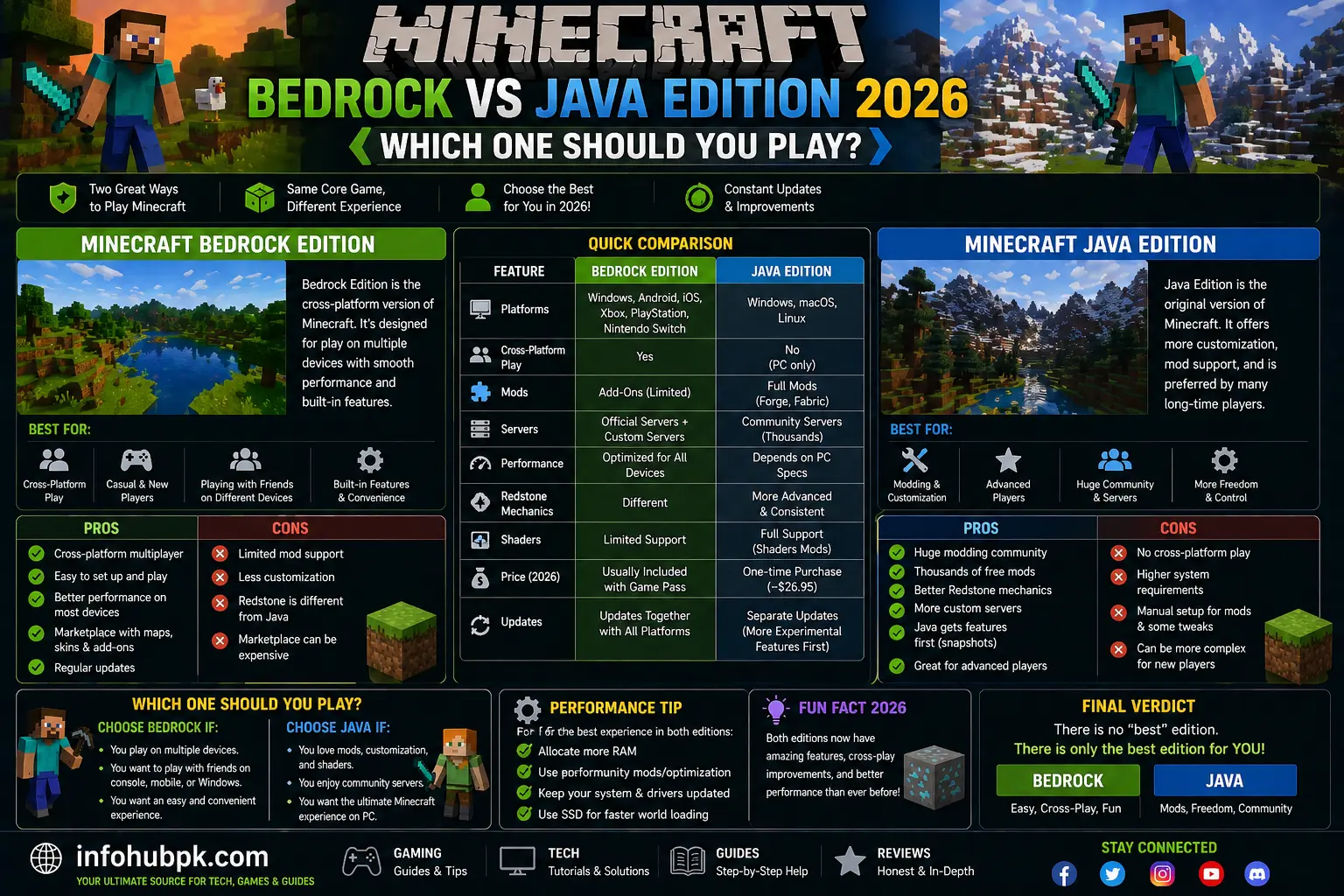
It is the ultimate debate that has split the community for years: Minecraft Bedrock vs Java Edition. Even in 2026, with both versions reaching the 1.21 update and beyond, the choice isn’t as simple as it seems. While Microsoft now bundles both versions together for PC players, knowing which one to actually install and play is crucial for your experience.
If you are a fan of technical mods and hardcore survival, your heart might lean towards Java. However, if you want to play with friends on Xbox, PlayStation, or Mobile, Bedrock is the undisputed king. In this guide, we will break down every major difference—from performance to gameplay mechanics—to help you decide which version deserves your time.
Table of Contents
-
Core Differences: Java vs. Bedrock
-
Performance and Graphics (The Lag Test)
-
Modding and Customization
-
Multiplayer and Cross-Play Capabilities
-
Marketplace vs. Free Community Content
-
Conclusion: Which is Better for You?
1. Core Differences: Java vs. Bedrock
The most fundamental difference is the “Engine.” Java Edition is built using Java (hence the name), which makes it highly flexible but sometimes resource-heavy. On the other hand, Bedrock Edition is built in C++, making it faster and more stable across different devices.
One thing many players notice is the “Feel” of the game. Java has a specific combat cooldown and “quasi-connectivity” in Redstone, which tech-players love. Bedrock feels a bit more modern but lacks some of those quirky Java bugs that have actually become beloved features.
2. Performance and Graphics (The Lag Test)
When it comes to raw performance, Bedrock Edition wins by a mile. It is designed to run on everything from high-end PCs to old Android phones. You can set your render distance to 64 chunks on Bedrock and still get a smooth experience.
Java Edition, however, is notorious for lag. If you choose Java, you will likely need to learn how to get more FPS in Minecraft by using optimization mods. While Java can look better with high-end shaders for low-end PCs, it requires much more effort to optimize than Bedrock’s built-in “RenderDragon” engine.
3. Modding and Customization
This is where Java Edition truly shines. The modding community on Java is massive and completely free. You can turn Minecraft into a space simulator, a realistic RPG, or a high-tech factory using loaders like Forge or Fabric.
Bedrock does have “Add-ons,” which are improving in 2026, but they are still not as powerful as Java mods. If your goal is to change the game entirely, Java is the only real choice. Just remember that more mods mean more memory usage, so make sure you know how to allocate more RAM to Minecraft before you start installing 200+ mods.
4. Multiplayer and Cross-Play Capabilities
If you want to play with friends, Bedrock Edition is much more convenient. It supports full “Cross-Play.” A PC player can easily join a friend who is playing on a Nintendo Switch or an iPhone.
Java Edition only allows you to play with other Java players. While you can make a Minecraft server for free using tools like Aternos, connecting a Java player to a Bedrock player requires complex “Geyser” plugins, which aren’t always perfect.
Comparison Table: At a Glance
| Feature | Java Edition | Bedrock Edition |
| Platform | PC (Windows, Mac, Linux) | PC, Console, Mobile |
| Performance | Lower (Needs Mods) | High (Optimized) |
| Modding | Unlimited & Free | Limited (Marketplace) |
| Multiplayer | Java-only Servers | Full Cross-Play |
| Combat | 1.9 Cooldown System | Classic Spam Clicking |
5. Marketplace vs. Free Community Content
In Bedrock Edition, most skins, maps, and texture packs are sold through the Minecraft Marketplace for “Minecoins.” While this supports creators, it can get expensive.
In Java Edition, almost everything—skins, maps, and resource packs—is available for free on community sites like Planet Minecraft or CurseForge. If you prefer a “community-driven” and free experience, Java is much better for your wallet.
FAQs
1. Can Java and Bedrock play together?
By default, no. However, some servers use a plugin called GeyserMC to allow Bedrock players to join Java servers.
2. Is Bedrock Edition more “buggy” than Java?
Some players call it “Bugrock” because of random falling damage or glitchy animations, but in terms of game-breaking crashes, Bedrock is actually more stable.
3. Do I have to buy both versions?
As of 2026, if you buy Minecraft on PC, you get both Java and Bedrock in one package. You just choose which one to launch from the Minecraft Launcher.
4. Which version is better for Redstone?
Java Edition is much better for Redstone because it is more consistent. Bedrock Redstone can sometimes be unpredictable.
5. Which version has better graphics?
Vanilla Bedrock has better lighting and performance, but Java with shaders is the most beautiful version of Minecraft possible.
